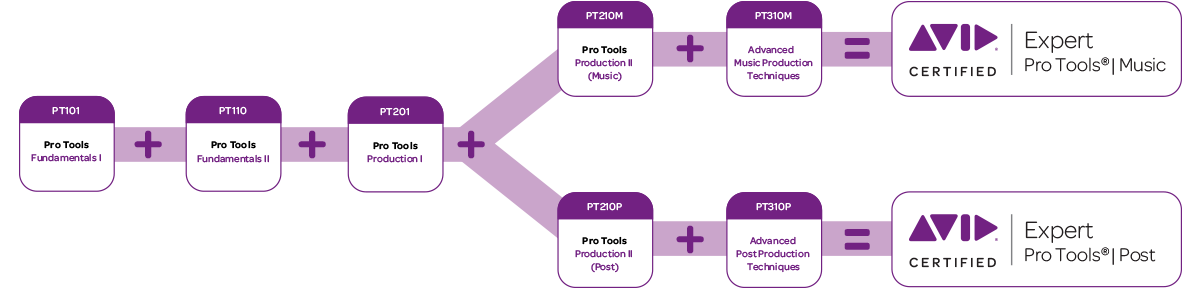
PT210P Pro Tools Production II (Post Production)
LENGTH
3 days, 24-30 hours
PRICE
only 995 € (excluding VAT 20%) CURRENTLY ONLY AS VIRTUAL CLASSROOM COURSE
Includes eBook and Pro Tools Operator Post production Certification exam
OVERVIEW
- This course provides essential knowledge for anyone working in Audio Post Production
- Learn all about building a rock solid, frame synced Pro Tools Hardware system, use Satellites for increased Track Count, Video Satellite for video playback and build massive multi-seat synchronised Pro Tools systems capable of running thousands of tracks, just like they do in Hollywood.
- Greatly enhance the value of your Pro Tools system by optimising it for Video workflows
- Use optimised Workflows for importing, OMF and AAF File interchange, fantastic time-saving Field Recorder Workflows, using and managing Meta Data, Dialogue Editing Techniques, ADR, Sound Design, Time Stamps, Replacing Clips, Workflows for using shared storage, Large Scale Mixing Workflows which let you automatically print all of your deliverables as you mix will save you hours of valuable time
- This course will allow you to take the Pro Tools Operator Certification for Post Production
- This, and much, much more in the PT210P Pro Tools Production II (Post Production) course
This course prepares candidates for the Avid Certified Operator: Pro Tools | Post certification exam. Candidates wishing to take this certification exam must have firstly passed the Avid Certified User: Pro Tools certification exam.
LEARNING OBJECTIVES
At the end of this course you will be able to:
- Set up MIDI devices for use with Pro Tools
- Match a session’s tempo to an existing audio performance
- Control plug-ins with MIDI controllers
- Utilize advanced MIDI and audio recording options
- Share tracks for collaboration using a variety of techniques
- Record multiple takes to playlists
- Use Playlists view and assemble a composite performance
- Use Dynamic Transport for working with loops
- Use Beat Detective for a variety of purposes
- Use advanced MIDI production techniques, including the Restore Performance function, the Select/Split Notes function, MIDI Editor windows, and the Score Editor window
- Create drum patterns using MIDI and enhance drum performances with MIDI drums and/or drum samples
- Work with Bar|Beat Markers and the Graphic Tempo Editor
- Add and edit Key Change events
- Use catalogs for sound libraries
- Use Cut Time, Insert Time, and clip groups for song arrangement
- Apply static automation techniques
- Use Preview and Punch Preview workflows
- Fine-tune automation using Trim mode
- Bounce and render stems and create final bounces in a variety of ways
- Sit the Avid Certified Operator: Pro Tools | Music certification exam
AUDIENCE
This course is designed for professional end-users wanting to learn how to use Pro Tools | Ultimate systems with HD-series hardware in a professional post production environment.
PREREQUISITES
Completion of the following courses and passing of the associated exams:
PT101 Pro Tools Fundamentals I
Avid Certified Operator: Pro Tools | Post
In the competitive world of audio post production, knowing the tools of the trade (and how to use them efficiently) is a key to success. The pathway to the gaining the certification of Avid Certified Operator for Pro Tools (Post) will empower you with the skills you need to make the most of your Pro Tools system in a Post Production environment. When successfully completed, your Avid Certified Operator certification will be a valuable, industry-recognized credential.
Check out the Tonkraftwerks full range of Avid Certifications for Pro Tools.
BENEFITS
- An extra level of confidence in your skills-for you as a user, and for your prospective employers
- Immediate industry recognition of proven expertise.
- (Optional with your expressed consent) A listing of your credentials on Avid’s searchable database Find a Certified Professional
FAQ
Q: Are there any prerequisites?
A: Yes. You must first earn the credential of Avid Certified User: Pro Tools before you can enroll in the classes for Certified Operator.
Q: How do I become a certified as an Avid Certified Operator for Pro Tools Post Production?
A: Two courses are required: PT201 Pro Tools Production I, and PT210P Pro Tools Production II (Post Production). To certify, you must complete each course including course projects/exercises at an official Avid Learning Partner, such as Tonkraftwerk, then pass each course completion exam.
Q: How long is certification good for?
A: Pro Tools Certification does not expire. You become certified for a particular version of Pro Tools software. Then, Avid Certified Operators for Pro Tools have an option to update their certification to a newer version by taking the Pro Tools update exam. Contact your local Avid Learning Partner for more information.
Q: Can I refer to study materials during the exam?
A: No. you are not allowed to reference any documentation or study materials during the exam.
Q: What is the format of the exam?
A: Each Pro Tools course exam is comprised of 50 questions and is directly tied to the content the respective course.The time allotted to complete each exam is 60 minutes and you need a score of at least 90% (40 correct answers) to pass the exam.
Q: What happens if I take the exam and do not pass?
A: Exam results are shown immediately when an exam is completed and submitted for evaluation.Unless a candidate is banned from retaking the exams for reasons of fraud or rule violations, the following retake policy applies:
• If you do not pass an exam, you may retake the exam after 24 hours have passed
• Once you have passed an exam, it may not be taken again for that version of the Avid product
Q: What will I receive if I successfully pass the exam?
A: Along with pride and confidence of becoming a part of an elite group of Pro Tools users, you will receive:
1. Official certificate available for printing or download, proving your Avid Certified Operator status.
2. Downloadable Logos, for use in your business marketing materials such as business cards and websites.
3. (Optional with your expressed consent) A listing of your credentials on Avid’s searchable database Find a Certified Professional
Available Courses
| |||||||||
| Monday | Tuesday | Wednesday | Thursday | Friday | Saturday | Sunday | |||
| 1 | 2 | 3 | 4 | 5 | 6 | 7 | |||
| 8 | 9 | 10 | 11 | 12 | 13 | 14 | |||
| 15PT210P – Pro Tools Production II (Post Production)PT210P – Pro Tools Production II (Post Production)Time: 9:00 am - 6:00 pm | 16PT210P – Pro Tools Production II (Post Production)PT210P – Pro Tools Production II (Post Production)Time: 9:00 am - 6:00 pm | 17PT210P – Pro Tools Production II (Post Production)PT210P – Pro Tools Production II (Post Production)Time: 9:00 am - 6:00 pm | 18 | 19 | 20 | 21 | |||
| 22 | 23 | 24 | 25 | 26 | 27 | 28 | |||
| 29 | 30 | 31 | |||||||
Upcoming Events
No Results Found
The page you requested could not be found. Try refining your search, or use the navigation above to locate the post.